Auslogics Disk Defrag 3.4.3.0
Updated on 17 May 2012
By Anthony Buckner
By Anthony Buckner
Specifications
License:
Freeware (Free)
Updated:
Downloads:
11725
Platform:
Windows (All Versions)
Publisher:
AusLogics, Inc(more)
Website:
User Reviews:
Other versions:
3.4.1.0, 3.3.0.2, 3.3.0.1
Do you like
Auslogics Disk Defrag?
FindMySoft Editor's Review
Auslogics Disk Defrag – Compact and Fast Defragmenter
Defragmenting your hard drive from time to time is something that you have to do if you want your computer to run smoothly and rapidly. You can take one of two roads when its time to defragment your hard drive. You can stay on Microsoft road and use the defragmenting tool that comes bundled with the Windows operating system. The thing is that the default defragmenting tool does an ok job, not an excellent job.
You can go on 3rd party road, and use a 3rd party application, like the Auslogics-developed and aptly named Auslogics Disk Defrag. This application can defragment FAT32 and NTFS formatted drives at a very rapid pace and it can consolidate free space and optimize system files placement.
Auslogics Disk Defrag does an excellent job and here’s why:
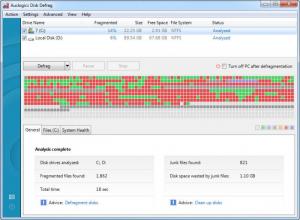
- The application’s interface is good looking and very easy to use.
- You can manually defragment your hard drive, you can use the scheduler to defragment the hard drive at a specific time, or you can set Auslogics Disk Defrag to automatically eliminate fragmentation as soon as it occurs.
- With all this talk about defragmenting the hard drive, it’s easy to forget that Auslogics Disk Defrag can also defragment a single file or folder.
- Auslogics Disk Defrag does its job efficiently and rapidly.
- Support is provided for multiple languages.
How much do you think Auslogics asks for this application? Nope, you’re wrong! Auslogics Disk Defrag is offered free of charge, which means you can use it for as long as you want and not part with your hard earned money.
Be careful during the installation process as Auslogics Disk Defrag offers to install the Auslogics Toolbar, make Ask.com your default search provider, and set Ask.com as your homepage.
Before you go get Auslogics Disk Defrag and put it to the test, take a look at the technical details presented below:
Download – the download weighs in at 4.4MB, which means it will complete in no time at all.
Supported OS – at the time of writing this and according to the developer, Auslogics Disk Defrag provides support for Windows XP, Server 2003 and 2008, Vista, and Windows 7 (32-bit and 64-bit editions).
Limitations – there are none, Auslogics Disk Defrag is free for home users.
If you want an application that is offered free of charge, is easy to use, and surpasses the functionality provided by the default defragmenting tool in Windows, you need to take a look at Auslogics Disk Defrag. This powerful application offers much needed functionality for the Windows user. You will be hard pressed to find another tool that is as easy to use and offers as much from a functionality point of view as Auslogics Disk Defrag does.
Pros
Cons
About Auslogics Software
Founded back in 2008 and headquartered in Sydney, Australia, Auslogics Software is a privately owned company that specializes in the development of computer maintenance and optimization software for Microsoft Windows. The company develops computer optimization, internet speed-up, disk and registry maintenance and defragmentation tools, virus and spyware protection, and emergency file recovery tools. More than 5 million people from all over the world use the applications developed by the team of bright, driven and passionate people on the Auslogics team.
Additional info on Auslogics Software is available here.
Additional info on Auslogics Disk Defrag is available here.
You can go on 3rd party road, and use a 3rd party application, like the Auslogics-developed and aptly named Auslogics Disk Defrag. This application can defragment FAT32 and NTFS formatted drives at a very rapid pace and it can consolidate free space and optimize system files placement.
Auslogics Disk Defrag does an excellent job and here’s why:
- The application’s interface is good looking and very easy to use.
- You can manually defragment your hard drive, you can use the scheduler to defragment the hard drive at a specific time, or you can set Auslogics Disk Defrag to automatically eliminate fragmentation as soon as it occurs.
- With all this talk about defragmenting the hard drive, it’s easy to forget that Auslogics Disk Defrag can also defragment a single file or folder.
- Auslogics Disk Defrag does its job efficiently and rapidly.
- Support is provided for multiple languages.
How much do you think Auslogics asks for this application? Nope, you’re wrong! Auslogics Disk Defrag is offered free of charge, which means you can use it for as long as you want and not part with your hard earned money.
Be careful during the installation process as Auslogics Disk Defrag offers to install the Auslogics Toolbar, make Ask.com your default search provider, and set Ask.com as your homepage.
Before you go get Auslogics Disk Defrag and put it to the test, take a look at the technical details presented below:
Download – the download weighs in at 4.4MB, which means it will complete in no time at all.
Supported OS – at the time of writing this and according to the developer, Auslogics Disk Defrag provides support for Windows XP, Server 2003 and 2008, Vista, and Windows 7 (32-bit and 64-bit editions).
Limitations – there are none, Auslogics Disk Defrag is free for home users.
If you want an application that is offered free of charge, is easy to use, and surpasses the functionality provided by the default defragmenting tool in Windows, you need to take a look at Auslogics Disk Defrag. This powerful application offers much needed functionality for the Windows user. You will be hard pressed to find another tool that is as easy to use and offers as much from a functionality point of view as Auslogics Disk Defrag does.
Pros
- Nice, easy to use interface
- Defragment while hard drives, or single files and folders
- Flexible scheduler
- Auto-defragmentation mode
- Consolidates free space
- Multilingual support
- Works with Widows 7
- Free for home use
Cons
- During the installation process it offers to install the Auslogics Toolbar, make Ask.com your default search provider, and set Ask.com as your homepage
About Auslogics Software
Founded back in 2008 and headquartered in Sydney, Australia, Auslogics Software is a privately owned company that specializes in the development of computer maintenance and optimization software for Microsoft Windows. The company develops computer optimization, internet speed-up, disk and registry maintenance and defragmentation tools, virus and spyware protection, and emergency file recovery tools. More than 5 million people from all over the world use the applications developed by the team of bright, driven and passionate people on the Auslogics team.
Additional info on Auslogics Software is available here.
Additional info on Auslogics Disk Defrag is available here.
Do you like Auslogics Disk Defrag
Advertising
Popular News
Microsoft recently announced that the parental controls for the upcoming Windows 8 operating system will be even better than what Windows 7 has to offer.
A look at the system requirements needed to run the most popular browsers out there today.
Auslogics Disk Defrag Awards
Auslogics Disk Defrag Editor's Review Rating
Auslogics Disk Defrag has been reviewed by George Norman on
14 Dec 2010. Based on the user interface, features and complexity, Findmysoft has rated
Auslogics Disk Defrag
4
out of 5 stars, naming it ExcellentYour Rating
Top Downloads
2.
Opera5.
Trillian8.
AIM9.
Skype10.
Ad-Aware12.
Nero13.
Google Earth14.
Picasa15.
Winamp16.
iTunes17.
RealPlayer18.
uTorrent19.
eMule20.
WinRAR21.
BitComet22.
WinZip23.
Shareaza24.
CCleaner25.
Recuva26.
Tweak UI27.
CuteFTP Home29.
Adobe Reader30.
NewsPiperBecome A Fan!
Link To Us!
Auslogics Disk Defrag
HTML Linking Code
HTML Linking Code
Latest Reviews